Hidden experimental tool

FleX LiveTool help

LiveTool is the runtime side of Flex. It installs the FleXLiveBridge UE4SS bridge and queues session-only commands such as known spawns, raw class summons, gravity changes, and time-scale changes while Half Sword is running.
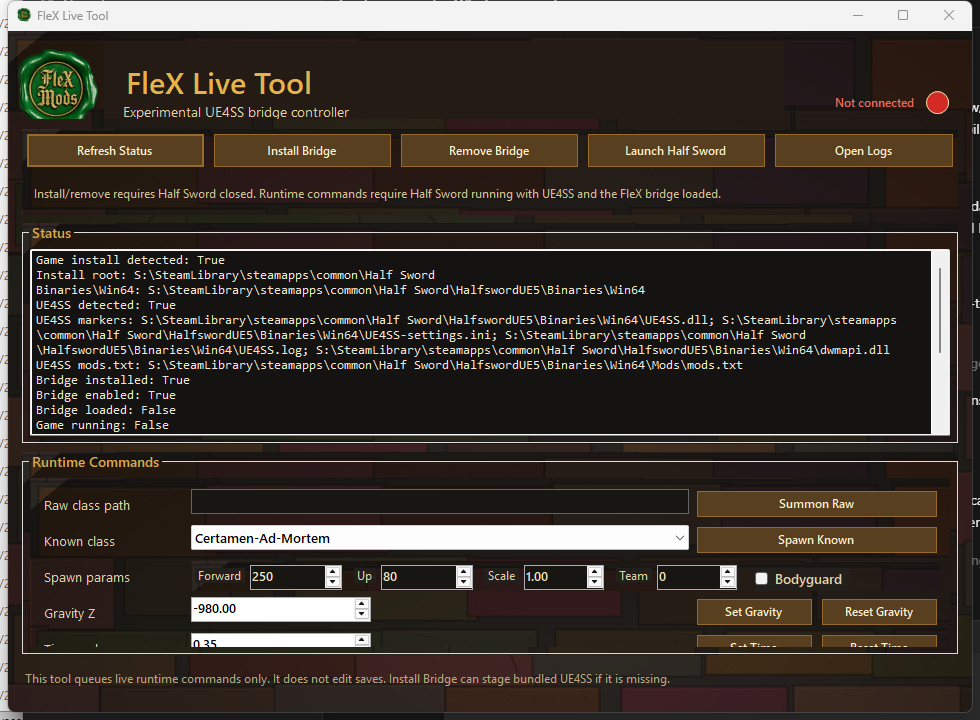
FleX LiveTool UI showing bridge status, Refresh Status, Install Bridge, Remove Bridge, Launch Half Sword, Open Logs, and runtime command controls.
LiveTool status and runtime command controls. Refresh status first, install or remove the bridge while Half Sword is closed, then send runtime commands only after the bridge is loaded.

What it does

Runtime commands, not save edits

LiveTool does not replace the normal save, preset, loadout, OVRDTH, or package workflows. It is for live runtime experimentation after the bridge is installed and loaded.

Bridge setup

Refresh Status checks Half Sword, UE4SS, the FleXLiveBridge install, bridge enablement, game running state, command folders, and logs.

Install and remove bridge

Install Bridge stages the bundled UE4SS payload when needed, copies FleXLiveBridge into the game Win64 Mods folder, and enables FleXLiveBridge in UE4SS Mods\mods.txt. Remove Bridge disables and removes only the Flex bridge.

Runtime commands

When Half Sword is running with the bridge loaded, LiveTool can queue raw class summons, known class spawns, gravity changes, and time-scale changes.

Spawn controls

Spawn commands support forward distance, height offset, scale, team, and bodyguard mode. Known classes are loaded from LiveToolCatalog and bundled weapon templates.

Logs

Open Logs jumps to the LiveTool or bridge logs so command failures can be inspected without digging through folders manually.

Runtime only

LiveTool queues live runtime commands. It does not edit saves, presets, loadouts, progression files, package mods, or Armory templates.

Setup order

Use this order when opening LiveTool

The bridge install touches the game's Win64 mod folders, so close Half Sword before installing or removing the bridge. Runtime commands are sent only after the game and bridge are running.

  1. Open LiveTool\FleXLiveTool.exe from the extracted Flex Mod Manager release or installed package.
  2. Click Refresh Status and read the status panel.
  3. Close Half Sword before Install Bridge or Remove Bridge.
  4. Click Install Bridge if UE4SS or FleXLiveBridge is missing. The installer can stage bundled UE4SS and enable FleXLiveBridge in Mods\mods.txt.
  5. Click Launch Half Sword or start the game normally.
  6. Click Refresh Status again and confirm Bridge loaded, Game running, and Can send commands are true.
  7. Queue one runtime command at a time: Spawn Known, Summon Raw, Set Gravity, Reset Gravity, Set Time, or Reset Time.
  8. Use Open Logs if a command does not appear to run.

Command reference

Runtime controls

Spawning

  • Summon Raw uses the class path you paste into Raw class path.
  • Spawn Known uses a class from the bundled LiveToolCatalog or bundled weapon templates.
  • Forward controls distance in front of the player.
  • Up controls height offset.
  • Scale changes actor scale.
  • Team and Bodyguard mode are for NPC/team experiments.

World controls

  • Set Gravity queues the entered Gravity Z value.
  • Reset Gravity restores the default gravity path.
  • Set Time queues the entered time-scale value.
  • Reset Time restores normal time scale.
  • Open Logs opens the tool or bridge log location for troubleshooting.

Safety

Keep LiveTool separate from save editing

Treat LiveTool as a live sandbox. For persistent characters, loadouts, OVRDTH templates, package mods, and backups, use the main Flex Mod Manager workflows instead.

Safety notes

  • LiveTool is a separate add-on, not part of the main v1 save or Armory workflow.
  • Install Bridge and Remove Bridge require Half Sword closed.
  • Runtime commands require Half Sword running with UE4SS and FleXLiveBridge loaded.
  • Runtime commands are session-only and do not replace normal save, preset, Armory, package, or backup workflows.
  • Test one command at a time before combining spawns, gravity changes, and time-scale changes.